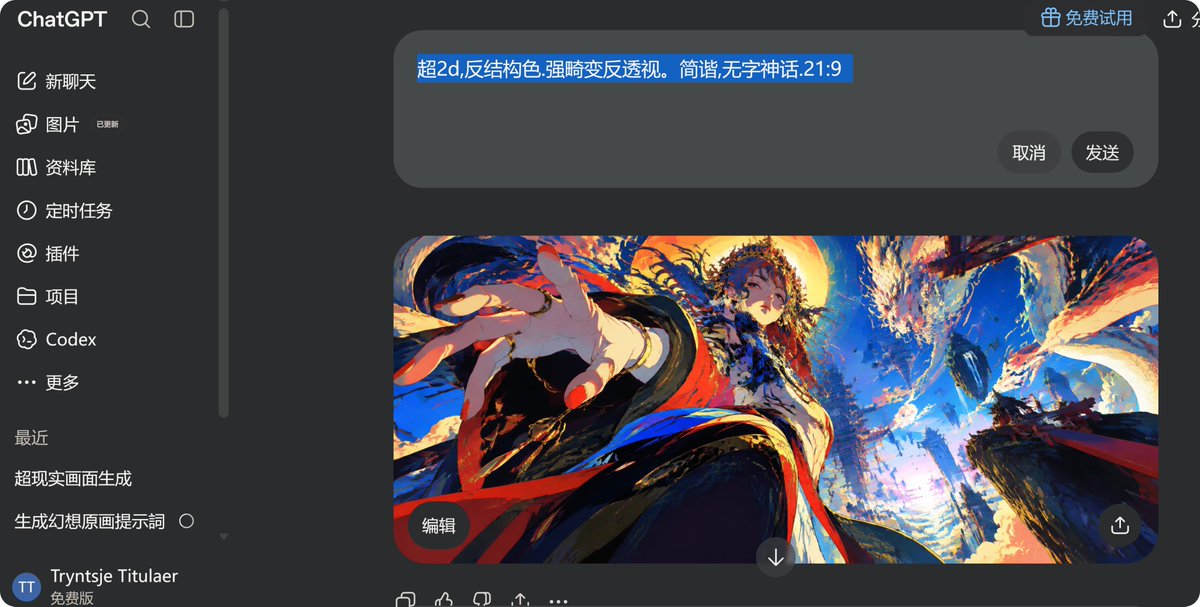
프롬프트/GPT Image 프롬프트/프롬프트 세부 정보이미지 프롬프트ChatGPT 애니메이션 이미지 생성 스크린샷중국어 프롬프트와 생생한 왜곡된 시점의 판타지 애니메이션 이미지 미리보기가 포함된 다크 모드 ChatGPT 데스크톱 스크린샷을 생성합니다.이 프롬프트는 참조 이미지와 함께 사용되었습니다이 프롬프트 사용좋아요2조회350북마크0이 프롬프트를 저장하거나 친구와 공유하세요.프롬프트 공유프롬프트복사Goal: Create a dark-mode desktop ChatGPT interface screenshot showing an image-generation conversation in Chinese, with a dramatic anime artwork preview in the main chat area. Canvas: Wide horizontal screenshot, 1200×608 px, dark charcoal UI, rounded corners and macOS-like browser/app framing. The interface is cropped so the left sidebar fills about 19% of the width and the main chat area fills the rest. Layout: Left navigation sidebar with the ChatGPT wordmark at top, a search icon, and a compact sidebar toggle icon. Below it, show exactly 8 primary navigation rows with icons and Chinese labels: 1) 新聊天, 2) 图片 with a tiny “已更新” badge, 3) 资料库, 4) 定时任务, 5) 插件, 6) 项目, 7) Codex, 8) 更多. Add a thin vertical scrollbar near the boundary between sidebar and chat. Under a “最近” heading, show exactly 2 recent chat items: “超现实画面生成” and “生成幻想原画提示词” with a small hollow circle to its right. Bottom-left user area: circular blue avatar with “TT”, username “Tryntje Titulaer”, and the label “免费版”. Main chat area: Top right includes a pill button with a gift icon and the text “免费试用”, plus small share/action icons partially visible. Near the top center, place a large rounded rectangular prompt input bubble in dark gray. Inside it, show a single highlighted blue text selection reading {argument name="selected prompt text" default="超2d,反结构色.强畸变反透视。简谐,无字神话.21:9"}. On the right side inside the input bubble, place exactly 2 dark round buttons labeled “取消” and “发送”. Generated image card: Below the input bubble, place one large rounded image preview card in a 21:9 aspect ratio, approximately 765×332 px, centered slightly right. At the lower-left of the image card, overlay one small rounded dark button labeled “编辑”. At the lower center just below/overlapping the card, place one circular down-arrow button. At the lower-right of the card, overlay one circular share/upload icon button. Artwork inside the generated image: Ultra-dynamic fantasy anime illustration in a distorted reverse-perspective fisheye composition, intense saturated colors, painterly brush texture, high contrast. A young mythic female figure in ornate flowing robes reaches one oversized hand dramatically toward the viewer from the left foreground; her body recedes upward into the center, with long dark hair, red ribbons/sashes, white and black garments, gold accents, and a calm mysterious expression. Background is a shattered celestial myth landscape with towering dark cliffs, swirling clouds, blue sky, golden sunset light, explosive brush strokes, floating debris, and an enormous dragon or phoenix-like creature arcing across the upper right. Color palette: electric cobalt blue, bright cyan, fiery orange, crimson red, cream white, deep navy, and black. No nudity, no explicit content. Bottom interaction row: Under the image card, show exactly 5 small action icons in a row: copy/duplicate, thumbs up, thumbs down, share/upload, and more/ellipsis. Visual style: Make the whole screenshot look like a real ChatGPT dark-theme desktop UI captured from a browser, with clean sans-serif text, Chinese UI labels, subtle shadows, and accurate rounded spacing. The generated artwork should be much more colorful and detailed than the surrounding UI. Constraints: Use exactly one generated image preview, exactly two prompt-input buttons, exactly eight sidebar navigation rows, exactly two recent chat items, and exactly five bottom action icons. Keep all visible text as specified, avoid watermarks, and do not add extra panels or unrelated UI.프롬프트 보기