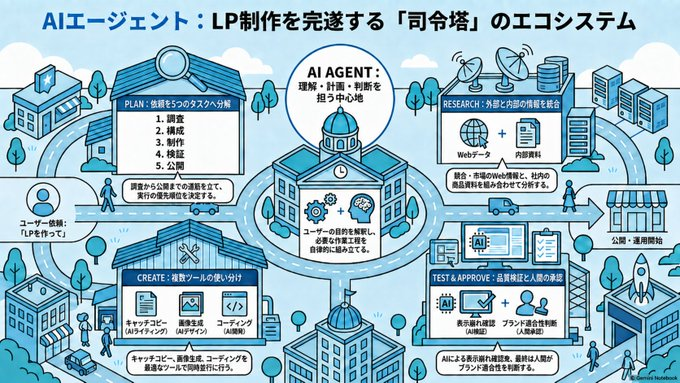
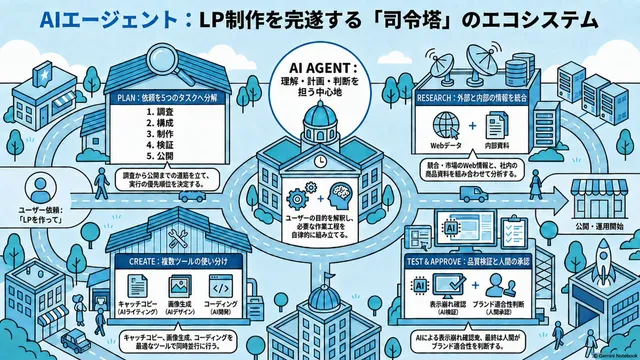
프롬프트/GPT Image 프롬프트/프롬프트 세부 정보이미지 프롬프트AI 에이전트 LP 생태계 인포그래픽랜딩 페이지 제작을 위한 계획, 연구, 생성, 검토 및 게시를 조정하는 AI 에이전트의 작동 방식을 보여주는 와이드 일본식 등각 투영 워크플로 인포그래픽입니다.이 프롬프트는 참조 이미지와 함께 사용되었습니다이 프롬프트 사용좋아요3조회1,487북마크0이 프롬프트를 저장하거나 친구와 공유하세요.프롬프트 공유프롬프트복사Goal: Create a wide 16:9 Japanese isometric infographic explaining an AI-agent ecosystem that completes landing page production through a “command tower” model, with the headline {argument name="headline text" default="AIエージェント:LP制作を完遂する「司令塔」のエコシステム"} across the top. Canvas: Horizontal slide, light sky-blue background with soft clouds, simple city-map roads, tiny trees, pedestrians, cars, and technology buildings. Use a clean blue, cyan, white, and black palette with thick rounded vector outlines, friendly SaaS/tech illustration style, crisp readable labels, and subtle halftone texture. No photorealism. Layout: Center a large circular roundabout containing the main AI Agent command-center building, with a domed roof, clock, gears, and brain icon. Around it place exactly 4 main workflow buildings/cards connected by roads and directional arrows: 1) PLAN at upper left, 2) RESEARCH at upper right, 3) CREATE at lower left, 4) TEST & APPROVE at lower right. Add a final publication destination on the far right: a storefront labeled as the publishing/operation start point with a rocket launch building nearby. Include supporting city objects: exactly 3 satellite dishes on the research building roof area, exactly 3 database/server stack icons near the upper right, exactly 2 tall office towers at the far right, exactly 1 small bank/store building at far upper left, exactly 1 office block at bottom left, and exactly 1 foreground dome building at bottom center. Text content: Use Japanese text throughout. Top title must read {argument name="headline text" default="AIエージェント:LP制作を完遂する「司令塔」のエコシステム"}. Central circle label: “AI AGENT:理解・計画・判断を担う中心地”. Inside the central building, add a small panel saying the agent understands user goals and automatically assembles necessary tasks. Left side user note: “ユーザー依頼:LPを作って!” Sections: Show exactly 4 labeled production modules with these visible labels and contents. PLAN module: title “PLAN:依頼を5つのタスクへ分解”; list exactly 5 numbered items: 1 調査, 2 構成, 3 制作, 4 検証, 5 公開; add a caption saying the request is decomposed into five tasks and execution priority is determined. RESEARCH module: title “RESEARCH:外部と内部の情報を統合”; show exactly 2 content icons labeled “Webデータ” and “内部資料”; caption about integrating competitor, market, and internal product information. CREATE module: title “CREATE:複数ツールの使い分け”; show exactly 3 tool icons labeled “キャッチコピー AIライティング”, “画像生成 AIデザイン”, and “コーディング AI開発”; caption saying copy, images, and coding are produced using appropriate specialized tools. TEST & APPROVE module: title “TEST & APPROVE:品質検証と人間の承認”; show exactly 3 verification icons: an AI chip, a checked monitor, and people/approval; include labels for display check, quality check, and brand/person-in-charge approval; caption saying AI handles display and quality checks and the final human approval begins publication. Subject details: Roads should visually connect every module to the central AI Agent hub, emphasizing relationships rather than a strict linear flow. Place the publish destination on the right with an arrow leading to a striped storefront labeled “公開・運用開始”. Add small decorative tech details such as antennas, document icons, code brackets, magnifying glass, gears, cloud shapes, and tiny people walking between buildings, but keep them secondary. Style constraints: Isometric 2.5D diagram, flat vector illustration, blue monochrome emphasis, black outlines, clean infographic composition, high legibility, no watermark except a tiny unobtrusive “Gemini Notebook” style credit in the bottom right if needed. Keep all labels compact and aligned inside white rounded panels.프롬프트 보기