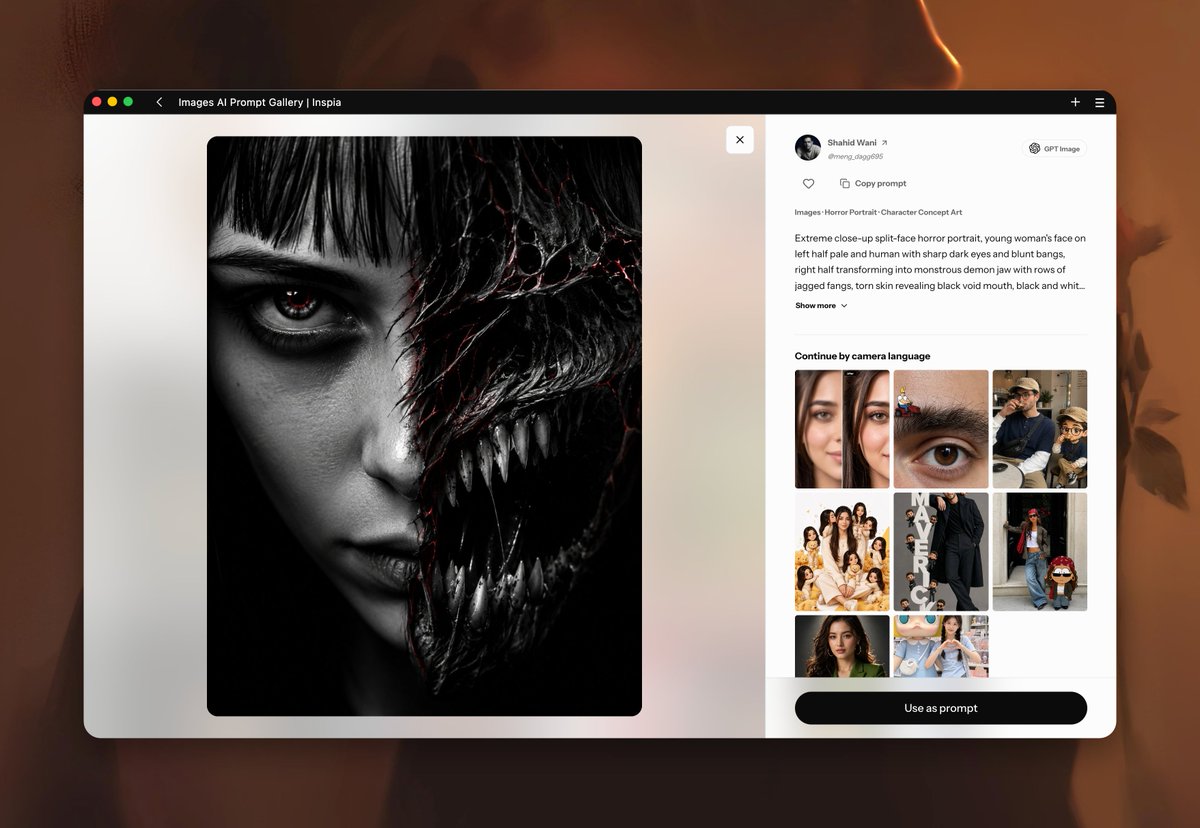
프롬프트/GPT Image 프롬프트/프롬프트 세부 정보이미지 프롬프트AI 프롬프트 갤러리 브라우저 목업공포 초상화 미리보기와 사이드바 컨트롤이 있는 AI 프롬프트 갤러리를 특징으로 하는 사실적인 데스크톱 웹 앱 스크린샷을 생성하기 위한 상세한 프롬프트입니다.이 프롬프트는 참조 이미지와 함께 사용되었습니다이 프롬프트 사용좋아요1조회16북마크0이 프롬프트를 저장하거나 친구와 공유하세요.프롬프트 공유프롬프트복사Goal: Create a polished desktop browser screenshot mockup of an AI image prompt gallery web app called {argument name="site title" default="Images AI Prompt Gallery | Inspia"}, shown floating over a blurred warm brown/orange background. Canvas: 1200×831 landscape image. Center a large rounded-corner browser window with a black top bar, subtle drop shadow, and macOS-style red, yellow, green window buttons at the top left. The browser occupies most of the frame, with soft orange blurred photographic shapes visible behind it. Layout: The web app is split into 2 main panels. Left panel is a large image preview area on an off-white to pale beige background, containing one square artwork with rounded corners. Right panel is a white details sidebar with user information, prompt text, a thumbnail grid, and a bottom action button. Top browser bar details: Show exactly 3 colored window dots on the far left, a small back chevron, the title text “Images AI Prompt Gallery | Inspia”, and exactly 2 icons on the far right: a plus sign and a hamburger menu. Left image preview: Display one large square horror portrait, nearly black-and-white, centered in the left panel. The portrait is an extreme close-up split-face image of a young woman: the left half is a human female face with pale skin, straight black bangs, a single intense dark eye with a tiny red reflection, dark under-eye makeup, and black lipstick; the right half transforms into a monstrous demon jaw with torn glossy black skin, cracked veiny texture with subtle red fissures, many sharp jagged teeth, and a gaping black mouth. Use dramatic high contrast, cinematic lighting, realistic texture, and a horror character concept art feel. Add one small white square close button with an “×” near the top-right of the left panel. Right sidebar details: At the top show a circular profile avatar, the creator name {argument name="creator name" default="Shahid Wani"} with a small external-link arrow, the handle “@meng_dog695”, and a small pill badge labeled {argument name="model badge" default="GPT Image"}. Under it show exactly 2 action controls: a heart icon and “Copy prompt”. Add the category line “Images · Horror Portrait · Character Concept Art”. Then show a prompt excerpt beginning with: {argument name="prompt excerpt" default="Extreme close-up split-face horror portrait, young woman's face on left half pale and human with sharp dark eyes and blunt bangs, right half transforming into monstrous demon jaw with rows of jagged fangs, torn skin revealing black void mouth, black and whit..."} followed by a “show more” label with a down chevron. Thumbnail section: Add the heading “Continue by camera language”. Below it create exactly 8 rounded image thumbnails arranged as a compact 3-column grid: row 1 has 3 thumbnails, row 2 has 3 thumbnails, row 3 has 2 thumbnails. The thumbnails should depict, in order: 1) two side-by-side female portrait close-ups, 2) an extreme close-up brown eye with tiny cartoon stickers on the eyebrow, 3) a seated man in cap beside a small cartoon doll, 4) a group portrait of multiple women in cream outfits, 5) a tall fashion photo of a person in black with vertical text, 6) a street-fashion woman with jeans and sunglasses beside a small doll, 7) a natural headshot of a curly-haired woman in a green top, 8) a woman posing with oversized cute plush characters. Bottom control: At the bottom of the sidebar place one wide black rounded pill button centered horizontally with white text {argument name="button text" default="Use as prompt"}. Visual style: Clean modern SaaS interface, crisp UI typography, realistic browser chrome, soft shadows, rounded corners, minimal iconography, strong contrast between the monochrome horror artwork and the bright white interface. Keep all UI text legible and do not add extra panels, thumbnails, buttons, or watermarks.프롬프트 보기