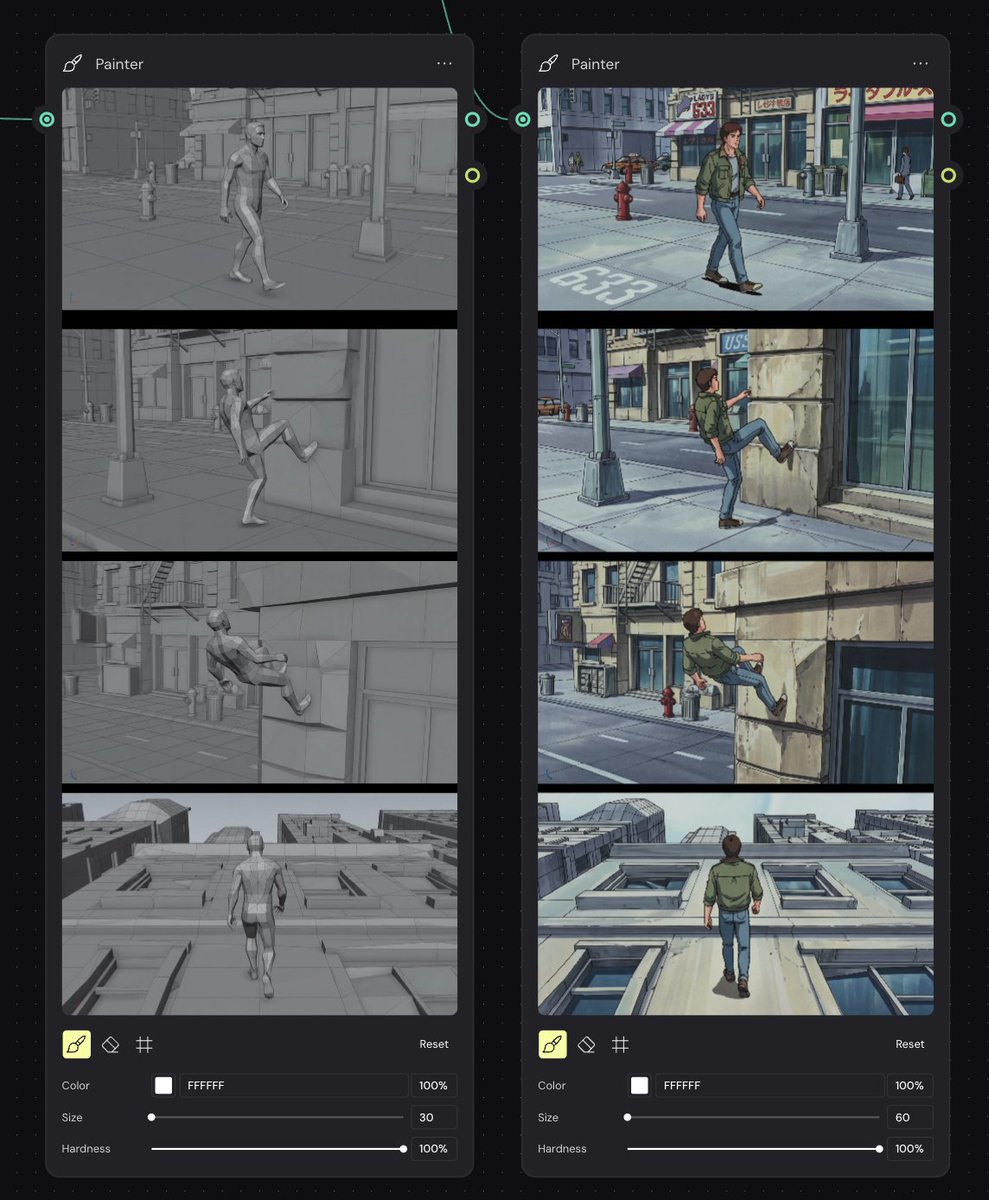
프롬프트/GPT Image 프롬프트/프롬프트 세부 정보이미지 프롬프트스토리보드 재렌더링 워크플로우 UI애니메이션 참조 워크플로우를 위해 회색 3D 모션 스토리보드와 90년대 애니메이션 스타일 재페인팅을 비교하는 어두운 노드 그래프 UI를 만듭니다.이 프롬프트는 참조 이미지와 함께 사용되었습니다이 프롬프트 사용좋아요14조회887북마크5이 프롬프트를 저장하거나 친구와 공유하세요.프롬프트 공유프롬프트복사Goal: Create a dark node-based workflow screenshot showing a side-by-side comparison between a gray 3D animation storyboard and a re-rendered 90s anime-style storyboard, as if inside a visual AI/compositing tool. Canvas: Landscape 4:3 screen capture on a nearly black dotted grid workspace. Add thin teal curved connector lines between nodes, with small circular input/output ports on the node edges. Layout: Place exactly 2 tall rounded-rectangle nodes side by side. Both nodes are titled “Painter” at the top left with a small brush/pen icon, and a three-dot menu at the top right. The left node shows the grayscale source storyboard; the right node shows the stylized output storyboard. Each node contains exactly 4 stacked widescreen storyboard frames separated by thick black dividers, followed by a compact painter control panel at the bottom. Left node storyboard frames: Render all 4 frames as monochrome gray 3D viewport/cinematic previz images with low-saturation clay materials and simple urban geometry. Frame 1: a generic male mannequin walks down a city sidewalk with storefronts, a hydrant, street pole, and road markings. Frame 2: the mannequin raises one leg toward a stone building wall as if beginning to climb. Frame 3: the mannequin is partially up the wall, body leaning back, legs pressed against the facade. Frame 4: rear view of the mannequin walking upward along a vertical building facade, with windows and rooftop perspective visible. Right node storyboard frames: Recreate the same 4 actions and camera angles, but as detailed {argument name="visual style" default="1990s hand-painted anime cel animation"}. Use a young adult male character with {argument name="character outfit" default="green jacket, blue jeans, and brown shoes"}, brown hair, and realistic anime proportions. Frame 1: he walks along a sunny city sidewalk past storefronts, a red fire hydrant, streetlight, and road marking “633”. Frame 2: he lifts his foot onto a stone wall beside a glass storefront. Frame 3: he climbs higher on the building facade, with street, hydrant, fire escape, and shop signs in the background. Frame 4: rear view as he walks vertically up the pale building wall, windows receding below him and rooftops visible ahead. Painter controls: At the bottom of each node show exactly 3 tool icons: a highlighted yellow brush icon, an eraser icon, and a grid/hash icon. Include a small “Reset” label on the right. Under the icons show exactly 3 labeled controls: Color with a white swatch and hex text “FFFFFF” plus “100%”; Size with a slider, left node value “30” and right node value “60”; Hardness with a slider and “100%”. Visual style: Crisp UI mockup, dark charcoal panels, rounded corners, subtle shadows, muted teal connector accents, precise alignment. The left storyboard should look like a gray 3D render, while the right storyboard should look like a polished anime repaint with blue-gray shadows, ink outlines, hand-painted backgrounds, and cinematic framing. Constraints: Use exactly 2 nodes, exactly 4 storyboard frames per node, and exactly 3 controls per node. Keep all visible UI text in English. Do not add extra panels, logos, watermarks, or explanatory captions outside the node interface.프롬프트 보기