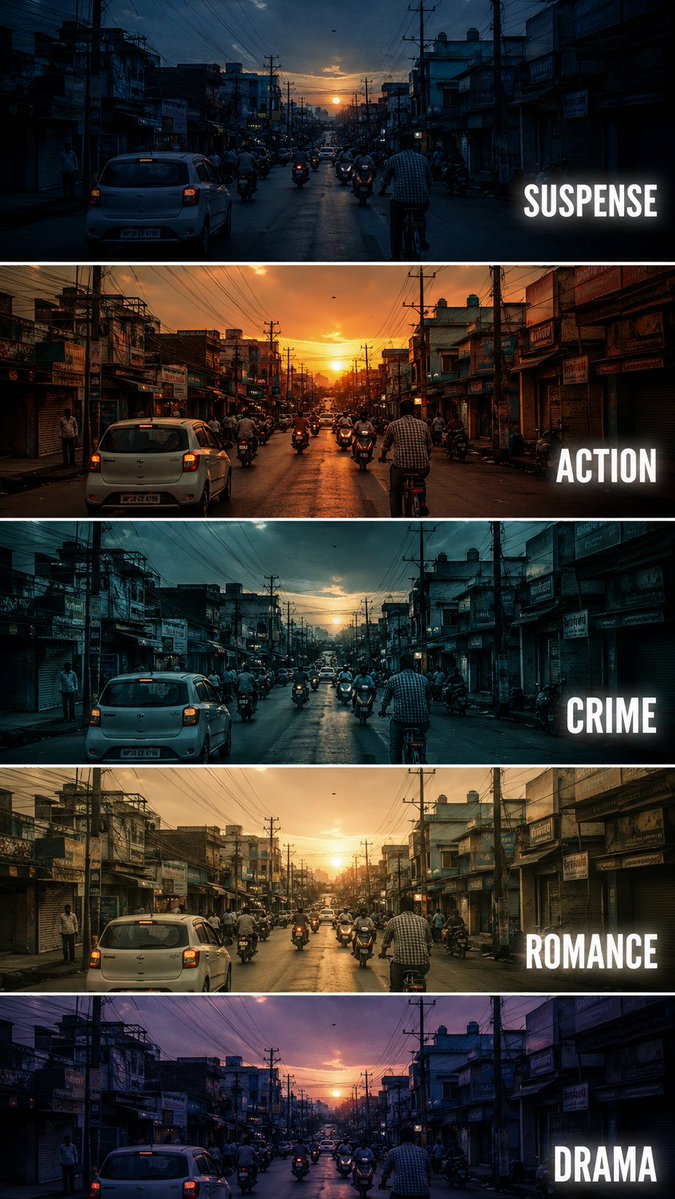
프롬프트/GPT Image 프롬프트/프롬프트 세부 정보이미지 프롬프트시네마틱 영화 장르 색상 보정 비교동일한 도시 거리 장면에 대한 다섯 가지 다른 영화 색상 보정 스타일을 비교하는 시네마틱 세로 포스터를 만들기 위한 상세한 프롬프트입니다.이 프롬프트 사용좋아요98조회3,160북마크80이 프롬프트를 저장하거나 친구와 공유하세요.프롬프트 공유프롬프트복사Create a {argument name="aspect" default="vertical"} cinematic tutorial comparison poster showing the same {argument name="subject" default="urban street scene"} repeated in five horizontal panels, each panel demonstrating a different film genre color grading style. The scene is a busy small city street at sunset, with cars, motorcycles, cyclists, shop buildings, electric poles, tangled overhead wires, and warm evening sky. Keep the camera angle exactly the same in every panel, like a fixed street photography shot. Each horizontal strip should have a different cinematic mood and color tone: Panel 1: SUSPENSE - cool blue shadows, dark contrast, slightly mysterious atmosphere, tense and moody lighting. Panel 2: ACTION - warm orange sunset tone, high contrast, energetic cinematic look, dramatic highlights. Panel 3: CRIME - cold teal blue grading, darker exposure, gritty urban feeling, realistic shadows. Panel 4: ROMANCE - soft golden warm tone, gentle contrast, nostalgic sunset mood, dreamy atmosphere. Panel 5: DRAMA - muted purple blue evening tone, emotional cinematic lighting, soft shadows and serious mood. Add bold white uppercase text on the right side of each panel: SUSPENSE, ACTION, CRIME, ROMANCE, DRAMA. Use clean modern sans serif typography with slight glow or subtle shadow. Separate each panel with thin white horizontal borders. Make it look like a professional filmmaking color grading tutorial thumbnail, cinematic, realistic, high detail, urban street photography, 9:16 vertical composition. Negative Prompt: cartoon, anime, painting, low quality, blurry, distorted buildings, extra text, wrong spelling, messy typography, overexposed, unrealistic colors, duplicated cars, warped street, bad perspective, random objects, low resolution, watermark프롬프트 보기