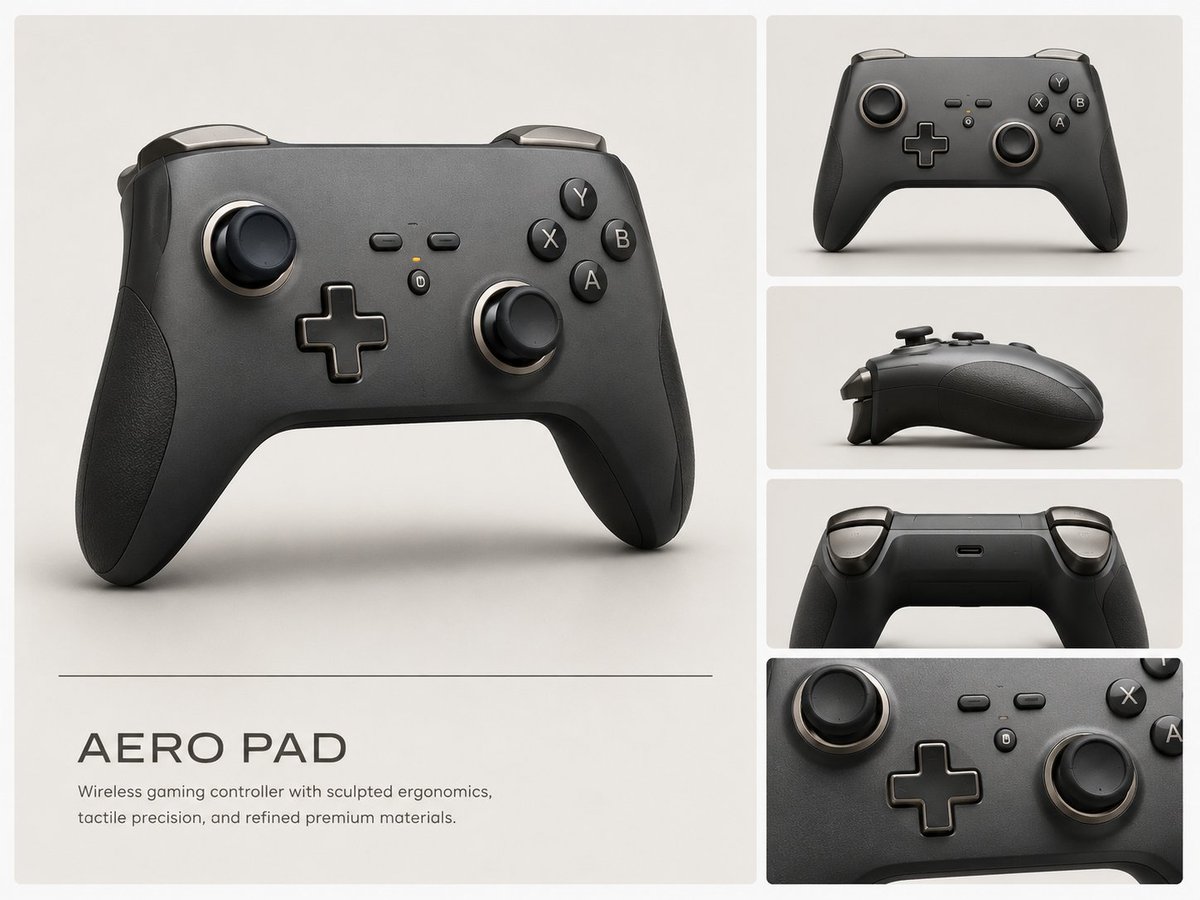
프롬프트/GPT Image 프롬프트/프롬프트 세부 정보이미지 프롬프트스케치에서 컨트롤러 디자인 보드까지제품 콘셉트 시각화에 유용한 거친 게임 컨트롤러 낙서에서 세련된 산업 디자인 프레젠테이션을 생성합니다.이 프롬프트는 참조 이미지와 함께 사용되었습니다이 프롬프트 사용좋아요0조회13북마크0이 프롬프트를 저장하거나 친구와 공유하세요.프롬프트 공유프롬프트복사Using REFERENCE_0 as the rough concept sketch, transform it into a polished professional industrial design presentation board for a premium wireless game controller. Preserve the overall controller silhouette and control layout from the sketch, but reinterpret it as a realistic matte black product with sculpted ergonomic grips, rounded shoulders, refined seams, tactile buttons, analog sticks, D-pad, shoulder triggers, subtle metallic rings, and premium material finishes. Canvas and layout: Create a clean 4:3 product concept board on a warm off-white studio background. Use exactly 5 rendered views: 1 large hero render on the left occupying most of the page, and 4 smaller stacked panels on the right showing: front view, side profile, rear/top view, and a close-up detail crop of the controls. Use thin white gutters between panels and soft studio shadows. Branding and text: Add a minimalist title block below the large hero render with the product name {argument name="product name" default="AERO PAD"} in spaced uppercase lettering, a thin horizontal divider line above it, and the description {argument name="tagline" default="Wireless gaming controller with sculpted ergonomics, tactile precision, and refined premium materials."} Style: High-end industrial design visualization, photorealistic 3D render, soft diffused lighting, matte graphite and black materials, subtle texture, clean Apple-like product presentation, no sketch lines remaining. Constraints: Do not add hands, people, packaging, logos, or extra accessories. Keep the design clearly derived from the reference sketch while making it look production-ready.프롬프트 보기