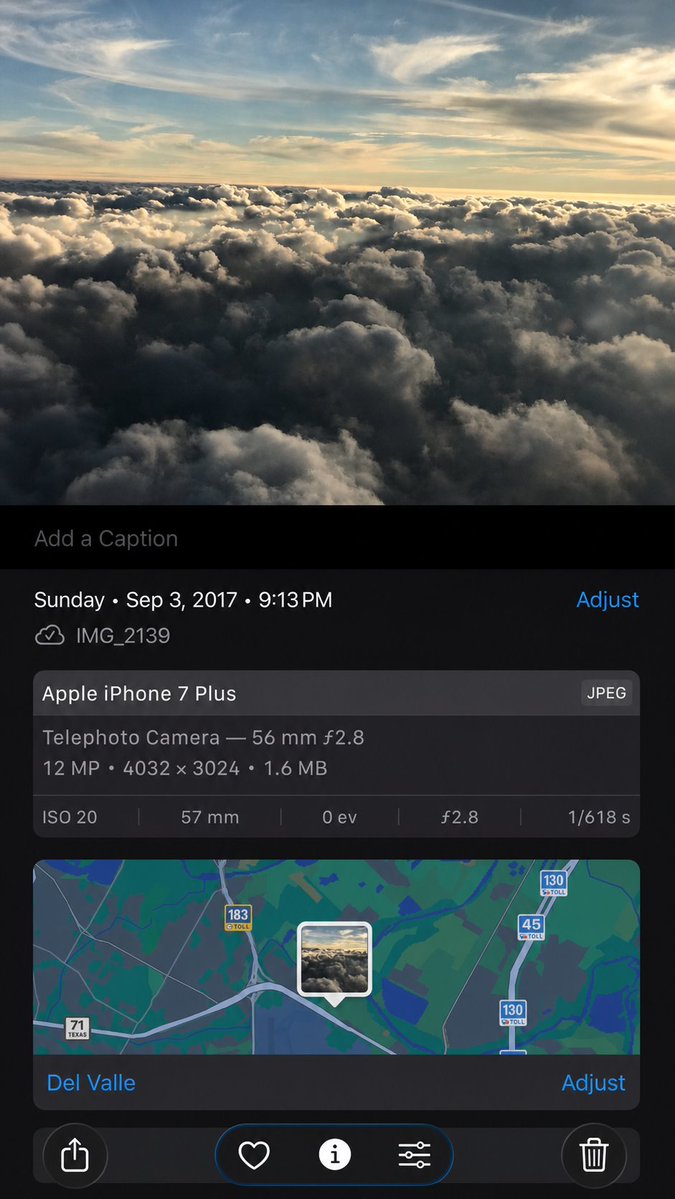
프롬프트/GPT Image 프롬프트/프롬프트 세부 정보이미지 프롬프트합성 아이폰 사진 메타데이터 스크린샷메타데이터, 지도 UI, 컨트롤을 유지하면서 이미지 콘텐츠를 미묘하게 재생성하면서 참조 스크린샷에서 사실적인 재구축된 아이폰 사진 세부 정보 화면을 만듭니다.이 프롬프트는 참조 이미지와 함께 사용되었습니다이 프롬프트 사용좋아요0조회108북마크0이 프롬프트를 저장하거나 친구와 공유하세요.프롬프트 공유프롬프트복사Using the provided iPhone Photos screenshot as the reference, recreate it as a cleaner, high-fidelity synthetic screenshot while preserving the same overall content: the cloud photo, the Photos app metadata panel, the map, date/time, filename, camera details, and bottom controls. Subtly rebuild the cloud image rather than copying it exactly, with a slightly wider-feeling crop, sharper modern rendering, and a more polished dark iOS interface. Keep the visible text and metadata unchanged, including {argument name="date and time" default="Sunday • Sep 3, 2017 • 9:13 PM"}, {argument name="filename" default="IMG_2139"}, {argument name="device name" default="Apple iPhone 7 Plus"}, {argument name="location" default="Del Valle"}, and {argument name="photo specs" default="Telephoto Camera — 56 mm ƒ2.8; 12 MP • 4032 × 3024 • 1.6 MB; ISO 20; 57 mm; 0 ev; ƒ2.8; 1/618 s"}. Include exactly 5 bottom toolbar icons: share, heart, information, adjustment sliders, and trash. Keep the map section with the centered photo-pin thumbnail and the visible road shields 71 Texas, 183 toll, 45 toll, and 130 toll.프롬프트 보기