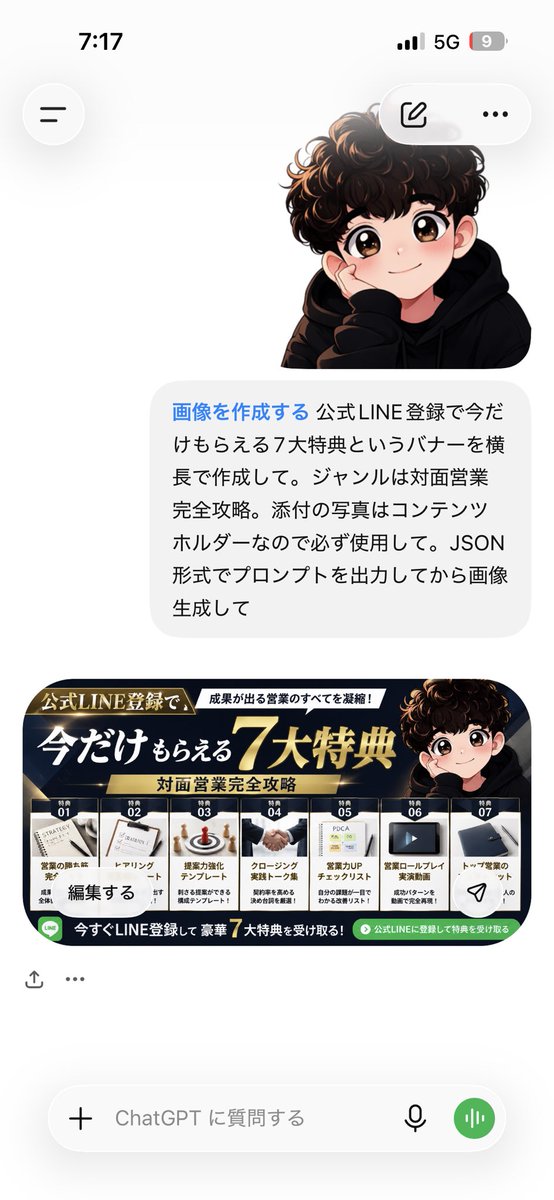
프롬프트/GPT Image 프롬프트/프롬프트 세부 정보이미지 프롬프트ChatGPT 보너스 배너 스크린샷7가지 프로모션 혜택이 있는 일본 LINE 등록 보너스 배너를 특징으로 하는 스마트폰 ChatGPT 스타일 스크린샷을 생성합니다.이 프롬프트는 참조 이미지와 함께 사용되었습니다이 프롬프트 사용좋아요5조회3,974북마크6이 프롬프트를 저장하거나 친구와 공유하세요.프롬프트 공유프롬프트복사Goal: Create a realistic vertical smartphone screenshot of a ChatGPT-style conversation showing a user asking for a promotional bonus banner and the AI returning the finished banner image. Canvas: 9:16 mobile screenshot, approximately 586 × 1024 px, white background, iPhone-like status bar at the top showing 7:17, 5G, and a low battery indicator. Minimal clean app UI with soft shadows and rounded controls. Layout: At the top left place a circular hamburger menu button. At the top right place a floating rounded pill with two icons: an edit/pencil icon and a three-dot menu. In the upper middle-right, show a cute anime-style boy avatar with curly dark brown hair, large sparkling eyes, rosy cheeks, and a black hoodie, resting his cheek on one hand. Below him place one large rounded light-gray chat bubble with Japanese prompt text. Beneath the bubble place one wide horizontal promotional banner image, scaled to fit the phone width. Under the banner add small app action icons, then a bottom input bar with a plus icon, placeholder text, microphone icon, and green voice button. Chat bubble text: Use Japanese text exactly as visible, with the first phrase in blue: 「画像を作成する」 followed by black text: 「公式LINE登録で今だけもらえる7大特典というバナーを横長で作成して。ジャンルは対面営業完全攻略。添付の写真はコンテンツホルダーなので必ず使用して。JSON形式でプロンプトを出力してから画像生成して」 Banner design: Create a high-conversion Japanese lead-magnet banner for {argument name="campaign" default="official LINE registration"}. Use a luxury black, navy, and gold color scheme with bright highlights, diagonal metallic accents, and a premium sales-promotion feel. The banner headline should read 「今だけもらえる 7大特典」 with a very large gold “7” and bold white/gold typography. Include the topic subtitle {argument name="topic" default="対面営業完全攻略"}. Include the same anime boy avatar on the right side of the banner. Banner sections: Show exactly 7 benefit cards in a row across the bottom, each with a small thumbnail image, a numbered label, and Japanese title text. The seven visible cards are: 1)営業の勝負所を完全攻略, 2)アプローチトーク, 3)提案力強化テンプレート, 4)クロージング実践トーク集, 5)営業力UPチェックリスト, 6)営業ロールプレイ実演動画, 7)トップ営業のセット. Add a green LINE-themed call-to-action strip along the bottom reading 「今すぐLINE登録して豪華 7大特典を受け取る!」 with a small green LINE icon. Visual style: The phone UI should look like a real screenshot, while the avatar and banner should be polished AI-generated digital art. Keep the chat interface spacious and uncluttered, with realistic rounded corners, subtle shadows, and crisp Japanese typography. Constraints: Use exactly one chat bubble, exactly one avatar above the bubble, exactly one banner image, exactly seven benefit cards in the banner, exactly two icons in the top-right floating pill, and exactly four controls in the bottom input bar. Do not add extra messages, watermarks, or unrelated text.프롬프트 보기