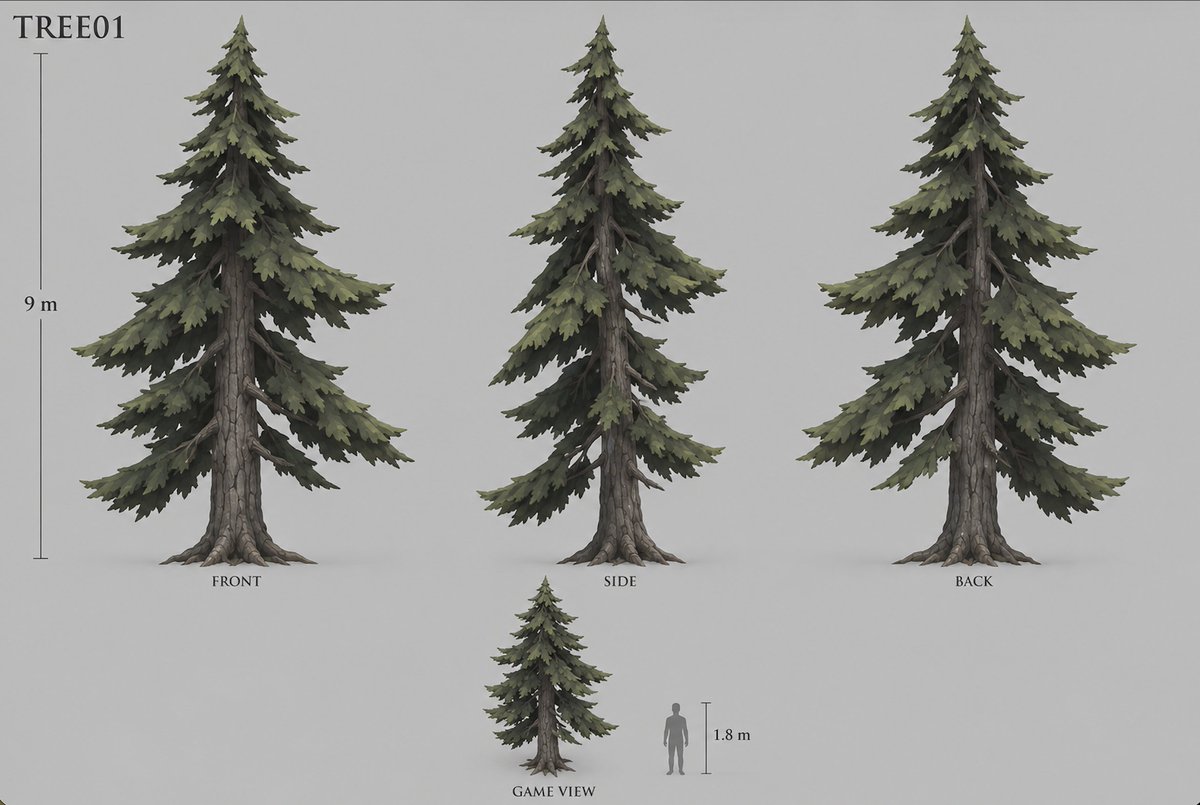
프롬프트/GPT Image 프롬프트/프롬프트 세부 정보이미지 프롬프트스타일화된 소나무 게임 에셋 시트3D 모델링 워크플로의 축척 참조가 있는 스타일화된 침엽수 게임 에셋을 위한 깔끔한 다중 뷰 컨셉 시트를 만듭니다.이 프롬프트는 참조 이미지와 함께 사용되었습니다이 프롬프트 사용좋아요30조회2,282북마크21이 프롬프트를 저장하거나 친구와 공유하세요.프롬프트 공유프롬프트복사Goal: Create a clean game-asset concept sheet for a stylized conifer tree labeled {argument name="asset code" default="TREE01"}, designed for conversion into a 3D model. Canvas: Wide horizontal concept-art sheet on a plain light gray background, soft studio lighting, no environment, no decorative border. Use muted natural colors and a painterly semi-realistic fantasy game style. Layout: Show exactly 4 tree depictions: 1 large front view on the left, 1 large side view in the center, 1 large back view on the right, and 1 smaller game-scale view near the bottom center. Add exactly 2 scale references: a vertical height ruler beside the large front tree labeled {argument name="tree height" default="9 m"}, and a gray human silhouette beside the small game view with a short vertical ruler labeled {argument name="human height" default="1.8 m"}. Place view labels under the trees: {argument name="front label" default="FRONT"}, "SIDE", "BACK", and "GAME VIEW". Subject details: The tree is a tall spruce or fir with a rugged straight trunk, visible gray-brown cracked bark, exposed root flares at the base, and layered drooping branch tiers. The foliage is dense but irregular, made of jagged clustered needle masses in desaturated olive green, dark pine green, and shadowed charcoal green. The silhouette is triangular and natural, with a pointed crown, asymmetric branch lengths, some bare branch sections visible near the trunk, and broad lower boughs tapering upward. The side view should look narrower with overlapping branches, while the back view should reveal similar foliage massing and trunk structure from behind. The small game view should repeat the same tree design at reduced scale, next to the human silhouette for proportion. Typography and annotations: Put the asset code in the upper-left corner in a simple serif typeface, large and black. Use small black serif labels beneath each view. Rulers are thin dark gray vertical lines with small caps and understated measurement text. Constraints: Keep the sheet uncluttered and orthographic, with consistent scale among the three large views. Use exactly the 4 tree depictions and 2 scale references described, avoid extra plants, rocks, UI elements, textures, logos, watermarks, or background scenery.프롬프트 보기