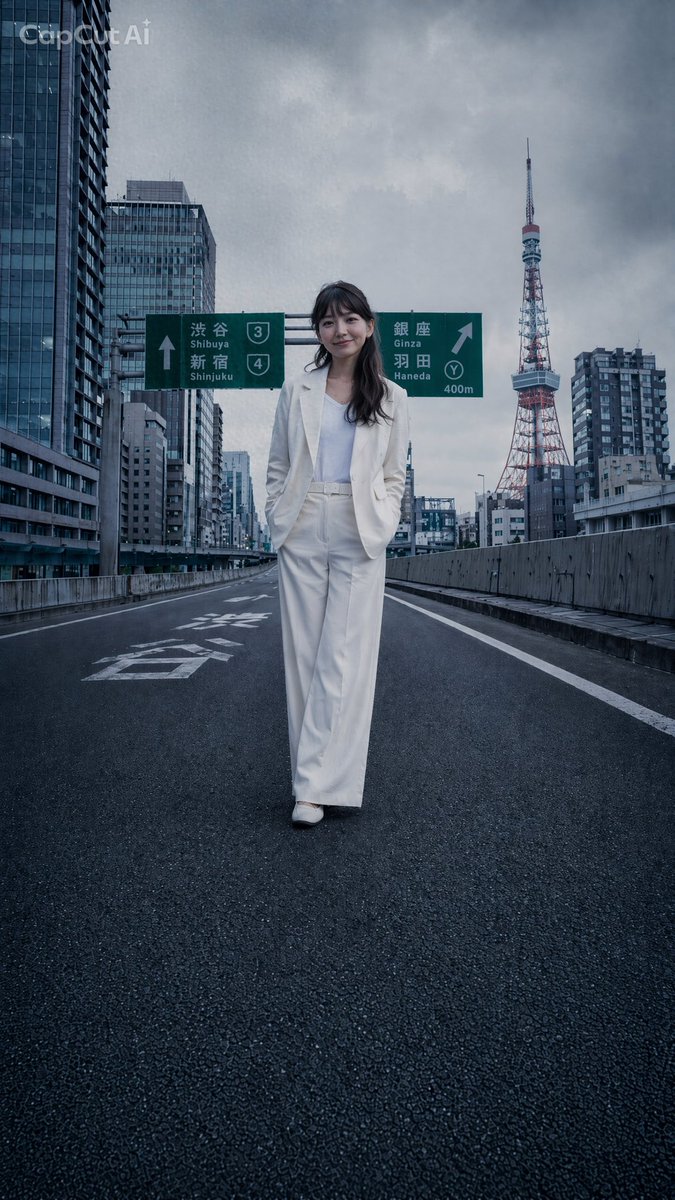
프롬프트/GPT Image 프롬프트/프롬프트 세부 정보이미지 프롬프트도쿄 고속도로 패션 에디토리얼이미지 1/2도쿄 타워를 배경으로 도쿄 고속도로를 걷는 흰색 정장을 입은 여성의 사진 같은 세로 패션 샷입니다.이 프롬프트는 참조 이미지와 함께 사용되었습니다이 프롬프트 사용좋아요0조회114북마크0이 프롬프트를 저장하거나 친구와 공유하세요.프롬프트 공유프롬프트복사Create a cinematic photorealistic editorial fashion image of {argument name="subject" default="a stylish young woman"} walking alone down the center of an empty elevated Tokyo expressway, as if the entire Shuto Expressway has been closed for a private shoot. She wears a crisp {argument name="outfit" default="all-white tailored pantsuit with a white top and white shoes"}, hands in trouser pockets, confident relaxed posture, full-body centered composition, long dark wavy hair, face softly anonymized or blurred. The road surface is dark wet-looking asphalt with strong perspective lines, white lane markings, concrete guardrails on both sides, no cars and no pedestrians. In the background, show dense modern Tokyo high-rise buildings and {argument name="landmark" default="Tokyo Tower"} on the right side under a dramatic cloudy gray sky. Include two green Japanese highway direction signs above and behind the subject: one pointing straight with “Shibuya” and “Shinjuku,” route shields 3 and 4; one pointing right with “Ginza,” “Haneda,” route shield Y, and “400m.” Use a cool blue-gray color grade, moody overcast lighting, wide-angle low street-level perspective, realistic lens depth, sharp architectural detail, high-fashion magazine atmosphere. Add a subtle semi-transparent {argument name="watermark text" default="CapCut AI"} watermark in the upper-left corner. Vertical {argument name="aspect ratio" default="9:16"} composition, ultra-realistic, no extra text beyond the signs and watermark.프롬프트 보기