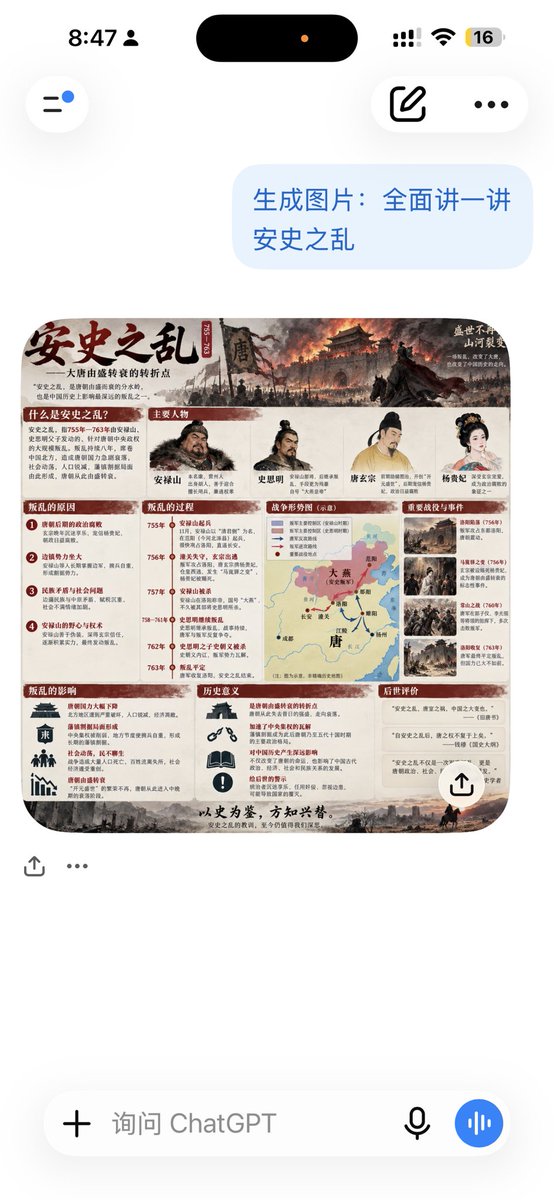
提示詞/GPT Image 提示詞/提示詞詳細資料圖片提示詞ChatGPT 安史之亂資訊圖截圖第 1 張圖片,共 2 張生成逼真的 ChatGPT 行動裝置截圖,包含關於安史之亂的詳細中文教育資訊圖。此提示詞使用了參考圖片立即使用讚13瀏覽5,725收藏5儲存此提示詞或分享給朋友。分享提示詞提示詞複製Goal: Create a realistic vertical smartphone screenshot of a ChatGPT conversation showing an AI-generated Chinese history infographic about {argument name="topic" default="安史之乱"}. Canvas: 576 × 1024 portrait phone screen, clean white iOS-style interface, high-resolution screenshot look with soft shadows and rounded UI elements. Top status and navigation: Show the iPhone status bar with exactly 5 visible status items: time “8:47”, a small user/person icon, black Dynamic Island with one tiny orange dot, cellular/Wi‑Fi indicators, and a battery badge reading “16”. Below it, show exactly 3 floating navigation controls: a left circular hamburger/menu button with a small blue notification dot, a right rounded pill containing an edit/compose icon, and a three-dot menu icon. Chat layout: On the right side near the top, place one light-blue user message bubble containing exactly this Chinese text: “生成图片:全面讲一讲\n安史之乱”. Beneath it, show one generated image card with rounded corners. Add exactly 2 small action icons under the card on the left: a share/upload icon and an ellipsis icon. Add one white circular share button overlay at the lower-right corner of the generated image card. Generated image card content: The card is a dense, horizontal Chinese educational infographic poster about the An Lushan Rebellion. Use an antique parchment and ink-wash historical style with dark red section headers, beige paper background, weathered borders, and a dramatic top banner painting of a burning Tang dynasty city, smoke, soldiers, banners, and a dark horse silhouette. Large brush-calligraphy title at upper left: “安史之乱”. Include a smaller subtitle about the major turning point of the Tang dynasty from prosperity to decline. Keep all infographic text in Chinese and make it appear mostly legible. Infographic sections: Use exactly 9 visible content sections in the poster: 1) “什么是安史之乱?” explanatory text block, 2) “主要人物” row with exactly 5 illustrated portrait figures labeled An Lushan, Shi Siming, Tang Xuanzong, Tang Suzong, and Yang Guifei, 3) “叛乱的原因” list with exactly 4 numbered causes, 4) “叛乱的过程” vertical timeline with exactly 6 dated milestones, 5) a central “叛乱形势图” map of Tang China with red and black arrows showing rebel and imperial movements, 6) “重要战役与事件” column with exactly 4 thumbnail battle/event images, 7) “叛乱的影响” block with exactly 4 icon-and-text impact items, 8) “历史意义” block with exactly 3 icon-and-text meaning items, and 9) “后世评价” block with exactly 3 quote cards. Add a bottom slogan line in Chinese resembling “以史为鉴,方知兴替。” with a small grayscale battlefield silhouette along the bottom edge. Bottom input bar: At the bottom of the phone screenshot, show the ChatGPT message composer as one rounded white pill with exactly 4 elements: a plus icon, gray placeholder text “询问 ChatGPT”, a microphone icon, and a blue circular voice-wave button. Visual style: Modern ChatGPT mobile UI combined with a richly detailed Chinese history infographic. The screenshot should feel like an authentic mobile app capture, with white margins, subtle drop shadows, rounded corners, and no external watermark. Constraints: Do not add extra chat messages. Keep the infographic fully contained inside the rounded image card. Preserve the visible Chinese text where specified. Use accurate Tang dynasty historical visual motifs and avoid fantasy elements.展開提示詞