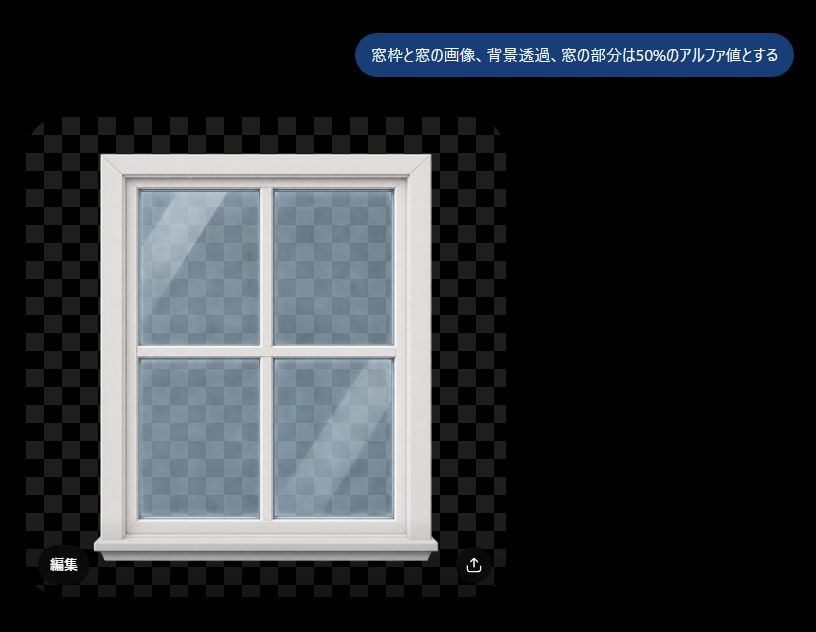
プロンプト/GPT Imageプロンプト/プロンプトの詳細画像プロンプト透明窓アルファデモチェッカーボードの透明背景の上に白い窓枠を配置し、ガラス窓が部分的に透明なUI風のデモ画像を生成します。このプロンプトは参照画像と共に使用されましたこのプロンプトを使ういいね2表示296ブックマーク1このプロンプトを保存するか、友達と共有しましょう。プロンプトを共有プロンプトコピーCreate a clean demonstration image on a black canvas showing a white-framed four-pane window graphic with transparency effects. The main subject is a realistic front-facing window centered slightly left, with a thick glossy white frame, beveled edges, a horizontal and vertical crossbar dividing the glass into exactly 4 rectangular panes, and a small sill at the bottom. Behind and through the window is a gray checkerboard transparency pattern, and the glass panes should show the checkerboard faintly with about 50% alpha, plus subtle bluish tint, soft reflections, and two diagonal light streaks. Around the window, include a larger semi-transparent checkerboard rectangle with alternating dark gray squares on the black background to clearly indicate transparency. At the top right, add one rounded blue speech-bubble label containing the Japanese text {argument name="instruction text" default="窓枠と窓の画像、背景透過、窓の部分は50%のアルファ値とする"} in white sans-serif type. At the bottom left of the checkerboard area, add one small dark rounded button labeled 「編集」, and at the bottom right add one small circular dark button with a white upload/share arrow icon. Keep the composition minimal, with no extra objects, no watermark, and crisp UI-like presentation.プロンプトを表示