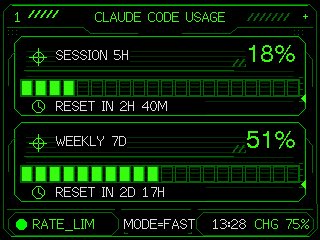
프롬프트/GPT Image 프롬프트/프롬프트 세부 정보이미지 프롬프트네온 M5Stack 사용량 게이지간단한 Claude 코드 사용량 게이지를 임베디드 M5Stack 스타일 화면을 위한 세련된 네온 HUD 대시보드로 변환합니다.이 프롬프트는 참조 이미지와 함께 사용되었습니다이 프롬프트 사용좋아요1조회140북마크0이 프롬프트를 저장하거나 친구와 공유하세요.프롬프트 공유프롬프트복사Using the provided reference image as the functional UI base, redesign it into a polished neon-green cyberpunk terminal interface suitable for an M5Stack-style 320×240 display. Keep the same two usage meters and overall information hierarchy, but replace the plain black layout with thin glowing vector line art, angular framed panels, pixel/monospace typography, and sci-fi HUD decorations. Convert the two meters into 2 stacked framed cards: 1) “SESSION 5H” with a crosshair icon, large percentage “{argument name="session percent" default="18%"}”, a segmented horizontal progress bar, and a clock/reset row reading “{argument name="session reset text" default="RESET IN 2H 40M"}”; 2) “WEEKLY 7D” with a crosshair icon, large percentage “{argument name="weekly percent" default="51%"}”, a segmented horizontal progress bar, and a clock/reset row reading “{argument name="weekly reset text" default="RESET IN 2D 17H"}”. Add a top header reading “{argument name="header text" default="CLAUDE CODE USAGE"}” centered, with decorative diagonal tick marks on both sides and a small plus sign at the top right. Add a bottom status bar with exactly 5 visible items: a green status dot, “RATE_LIM”, “MODE=FAST”, “13:28”, and “CHG 75%”. Use only black background, bright green strokes, darker green grid/bar outlines, and crisp pixel-perfect rendering; make the final image look like a refined embedded-device dashboard rather than a flat mockup.프롬프트 보기