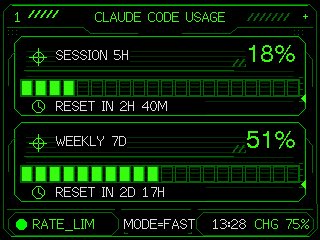
提示词/GPT Image 提示词/提示词详情图片提示词霓虹M5Stack使用量仪表将简单的Claude Code使用量仪表转化为精致的霓虹HUD仪表盘,适用于嵌入式M5Stack风格屏幕。这条提示词使用了参考图片立即使用点赞1浏览140收藏0保存这条提示词,或分享给朋友。分享提示词提示词复制Using the provided reference image as the functional UI base, redesign it into a polished neon-green cyberpunk terminal interface suitable for an M5Stack-style 320×240 display. Keep the same two usage meters and overall information hierarchy, but replace the plain black layout with thin glowing vector line art, angular framed panels, pixel/monospace typography, and sci-fi HUD decorations. Convert the two meters into 2 stacked framed cards: 1) “SESSION 5H” with a crosshair icon, large percentage “{argument name="session percent" default="18%"}”, a segmented horizontal progress bar, and a clock/reset row reading “{argument name="session reset text" default="RESET IN 2H 40M"}”; 2) “WEEKLY 7D” with a crosshair icon, large percentage “{argument name="weekly percent" default="51%"}”, a segmented horizontal progress bar, and a clock/reset row reading “{argument name="weekly reset text" default="RESET IN 2D 17H"}”. Add a top header reading “{argument name="header text" default="CLAUDE CODE USAGE"}” centered, with decorative diagonal tick marks on both sides and a small plus sign at the top right. Add a bottom status bar with exactly 5 visible items: a green status dot, “RATE_LIM”, “MODE=FAST”, “13:28”, and “CHG 75%”. Use only black background, bright green strokes, darker green grid/bar outlines, and crisp pixel-perfect rendering; make the final image look like a refined embedded-device dashboard rather than a flat mockup.展开提示词