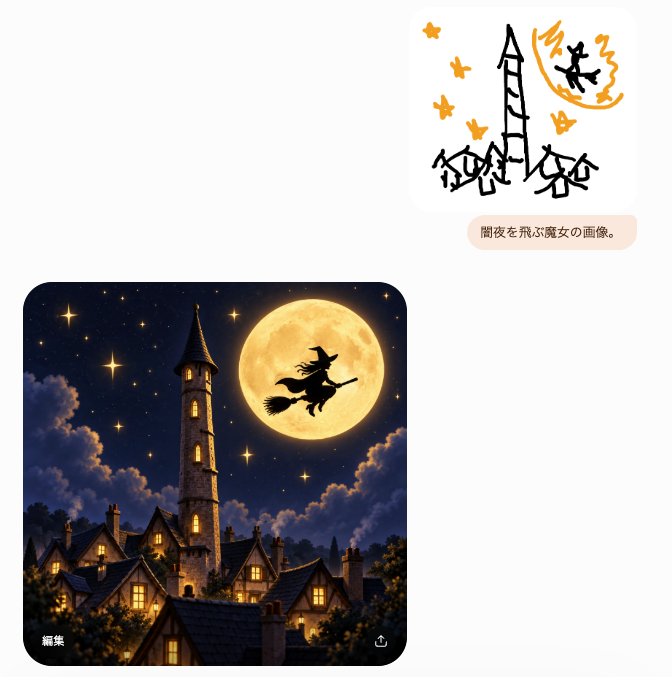
프롬프트/GPT Image 프롬프트/프롬프트 세부 정보이미지 프롬프트마녀 스케치를 판타지 결과 UI로조잡한 마녀 낙서 프롬프트가 세련된 달빛 판타지 마을 이미지로 변환되는 채팅 스타일 UI 스크린샷을 만듭니다.이 프롬프트는 참조 이미지와 함께 사용되었습니다이 프롬프트 사용좋아요2조회326북마크0이 프롬프트를 저장하거나 친구와 공유하세요.프롬프트 공유프롬프트복사Goal: Create a minimalist chat-style image generation interface screenshot showing a rough sketch prompt and a polished generated result. Canvas: Square-ish light gray/off-white background, about 665×677 px, with lots of empty space. Use a clean modern mobile/web UI aesthetic with rounded cards and subtle shadows. Layout: Place exactly 3 main UI elements: 1 small sketch image card in the upper right, 1 small rounded text prompt bubble directly below it, and 1 large generated image card in the lower left. Leave the left side mostly blank above the large card. Upper sketch card: A white rounded rectangle with a childlike black-and-orange doodle. The doodle contains exactly 6 orange star shapes, a tall crooked black tower in the center, 3 small black haunted houses along the bottom, an orange full moon in the upper right, and 1 black witch silhouette flying across the moon. Keep the sketch rough, marker-like, playful, and sparse. Prompt bubble: A pale peach rounded pill below the sketch card containing the Japanese text {argument name="prompt bubble text" default="闇夜を飛ぶ魔女の画像。"} in small dark brown type. Generated image card: A large rounded-corner square image in the lower left, cinematic fantasy style. Depict a cozy gothic village at night beneath a deep navy starry sky. Include exactly 1 tall stone clock/bell tower with a pointed dark roof near the left-center, exactly 1 enormous glowing golden full moon near the upper right, and exactly 1 black witch silhouette riding a broom in front of the moon. Include clustered steep-roof houses with warm yellow-lit windows in the foreground, soft glowing stars, dramatic moonlit clouds, and dark treetops framing the bottom. The image should feel like a highly polished transformation of the crude sketch. UI details: On the lower-left corner inside the large generated image, show the small white Japanese label {argument name="edit label" default="編集"}. On the lower-right corner inside the same image, show a small white share/export icon. No other visible text. Visual style: High contrast between the simple doodle and the refined result; rounded corners; soft app-interface spacing; no watermark; no extra panels; keep the composition faithful to a generated-image chat result.프롬프트 보기