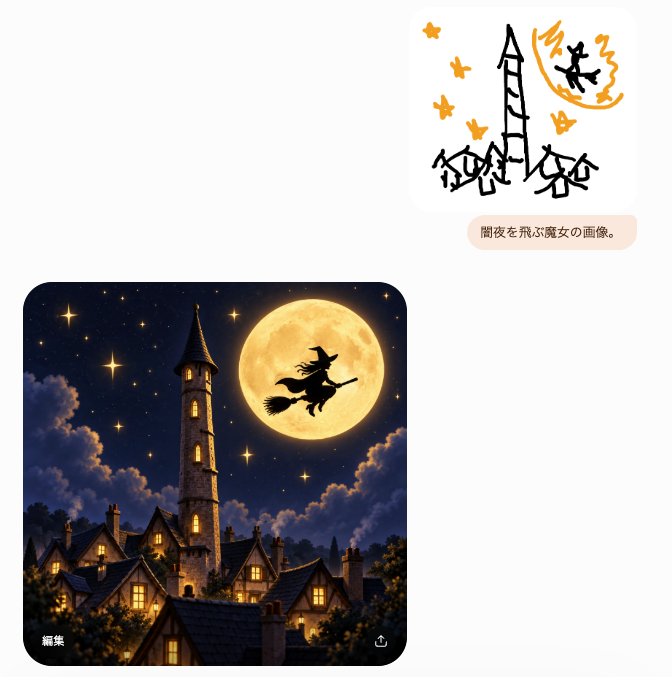
提示词/GPT Image 提示词/提示词详情图片提示词女巫草图到幻想结果UI创建一个聊天风格的UI截图,展示一个粗糙的女巫涂鸦提示如何变成一个精致的月光幻想村庄图像。这条提示词使用了参考图片立即使用点赞2浏览326收藏0保存这条提示词,或分享给朋友。分享提示词提示词复制Goal: Create a minimalist chat-style image generation interface screenshot showing a rough sketch prompt and a polished generated result. Canvas: Square-ish light gray/off-white background, about 665×677 px, with lots of empty space. Use a clean modern mobile/web UI aesthetic with rounded cards and subtle shadows. Layout: Place exactly 3 main UI elements: 1 small sketch image card in the upper right, 1 small rounded text prompt bubble directly below it, and 1 large generated image card in the lower left. Leave the left side mostly blank above the large card. Upper sketch card: A white rounded rectangle with a childlike black-and-orange doodle. The doodle contains exactly 6 orange star shapes, a tall crooked black tower in the center, 3 small black haunted houses along the bottom, an orange full moon in the upper right, and 1 black witch silhouette flying across the moon. Keep the sketch rough, marker-like, playful, and sparse. Prompt bubble: A pale peach rounded pill below the sketch card containing the Japanese text {argument name="prompt bubble text" default="闇夜を飛ぶ魔女の画像。"} in small dark brown type. Generated image card: A large rounded-corner square image in the lower left, cinematic fantasy style. Depict a cozy gothic village at night beneath a deep navy starry sky. Include exactly 1 tall stone clock/bell tower with a pointed dark roof near the left-center, exactly 1 enormous glowing golden full moon near the upper right, and exactly 1 black witch silhouette riding a broom in front of the moon. Include clustered steep-roof houses with warm yellow-lit windows in the foreground, soft glowing stars, dramatic moonlit clouds, and dark treetops framing the bottom. The image should feel like a highly polished transformation of the crude sketch. UI details: On the lower-left corner inside the large generated image, show the small white Japanese label {argument name="edit label" default="編集"}. On the lower-right corner inside the same image, show a small white share/export icon. No other visible text. Visual style: High contrast between the simple doodle and the refined result; rounded corners; soft app-interface spacing; no watermark; no extra panels; keep the composition faithful to a generated-image chat result.展开提示词