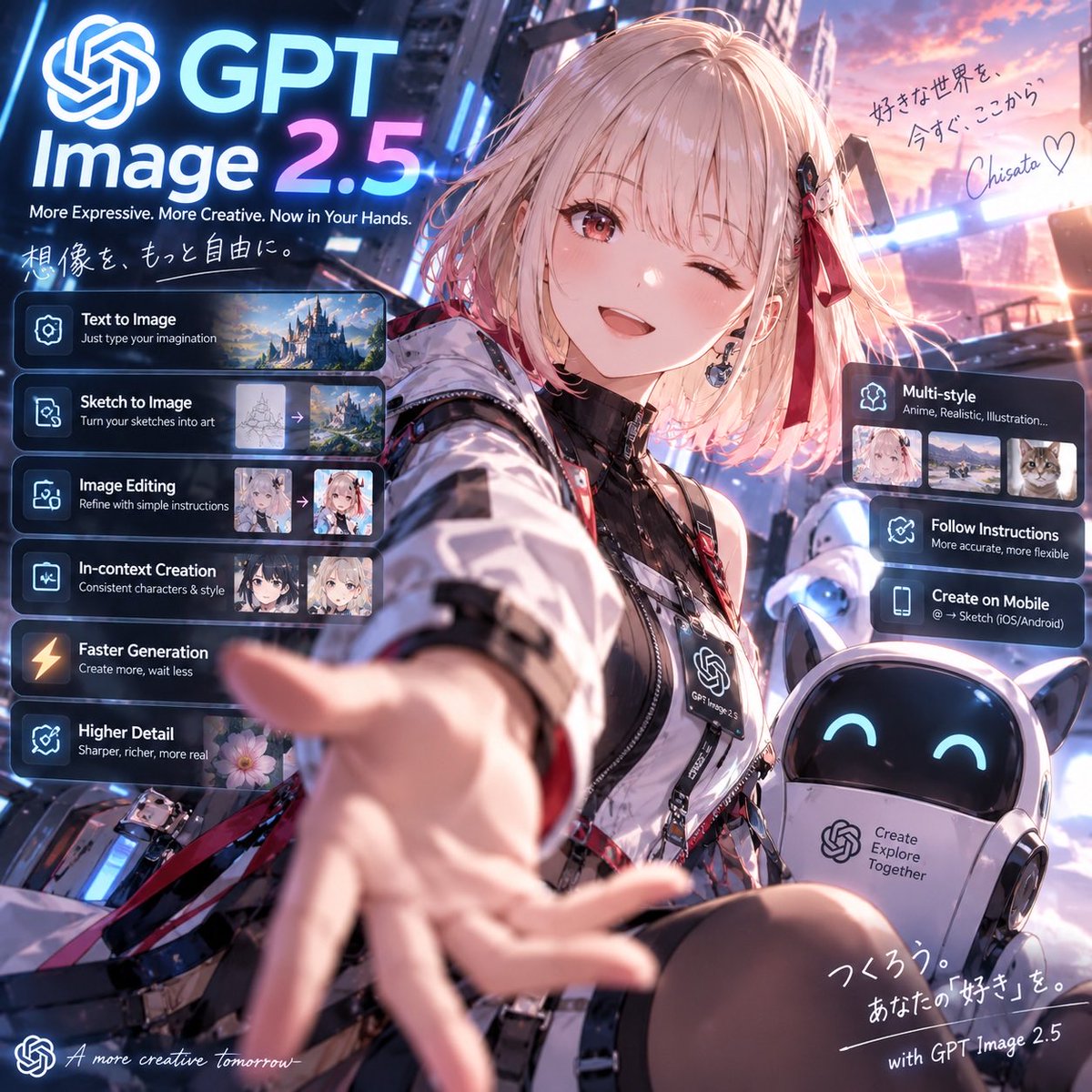
提示詞/GPT Image 提示詞/提示詞詳細資料圖片提示詞GPT Image 2.5 動漫上市海報創作方形未來感動漫宣傳海報,包含眨眼科技服吉祥物、機器人夥伴,以及細節豐富的 GPT Image 2.5 功能 UI 卡片。此提示詞使用了參考圖片立即使用讚11瀏覽543收藏0儲存此提示詞或分享給朋友。分享提示詞提示詞複製Goal: Create a polished square promotional anime key visual for {argument name="product name" default="GPT Image 2.5"}, presenting it as a futuristic creative image-generation service with a cheerful anime ambassador reaching toward the viewer. Canvas: 1:1 square social-media poster, cinematic neon city background at sunset, high-detail anime illustration blended with sleek SaaS launch-page UI overlays. Use strong depth of field: the character’s outstretched hand is large and slightly motion-blurred in the foreground, her face is sharp, and the city is softly glowing behind her. Main subject: A cute anime girl in the center-right foreground, about teenage/young adult style, short fluffy {argument name="hair color" default="pale pink-blonde"} bob hair with bangs, one eye winking and one warm reddish-brown eye open, smiling brightly. She wears a futuristic black-and-white techwear jacket with glossy panels, straps, zippers, badges, red ribbon accents, black inner top, and a lanyard badge printed with the OpenAI-like knot logo and “GPT Image 2.5”. Her right arm reaches toward the camera invitingly. Add a small black-and-red hair clip and ribbon on one side. Companion robot: Place exactly 1 small rounded companion robot at the lower right, white body with cat-ear-like points, glossy black face screen, cyan smiling eyes, and a chest panel containing the OpenAI-like knot logo plus the text “Create Explore Together”. Branding and headline: At the upper left, place a large glowing OpenAI-like knot icon followed by huge text “GPT” on the first line and “Image 2.5” below it, with “2.5” in a blue-to-pink neon gradient. Under it, add the tagline “More Expressive. More Creative. Now in Your Hands.” Add handwritten Japanese text beneath: 「想像を、もっと自由に。」 Left feature stack: Add exactly 6 translucent dark glassmorphism cards stacked vertically on the left, each with a glowing icon, bold white title, smaller subtitle, and where visible a small preview thumbnail strip. The 6 cards are: 1) “Text to Image” with subtitle “Just type your imagination” and 1 landscape castle thumbnail; 2) “Sketch to Image” with subtitle “Turn your sketches into art” and 2 thumbnails showing a sketch converting to a fantasy landscape with an arrow; 3) “Image Editing” with subtitle “Refine with simple instructions” and 2 anime portrait thumbnails with an arrow; 4) “In-context Creation” with subtitle “Consistent characters & style” and 2 anime character thumbnails; 5) “Faster Generation” with subtitle “Create more, wait less” and a lightning icon; 6) “Higher Detail” with subtitle “Sharper, richer, more real” and 1 flower thumbnail. Right feature stack: Add exactly 3 translucent dark glassmorphism cards on the right side. The top card is “Multi-style” with subtitle “Anime, Realistic, Illustration...” and exactly 3 thumbnails: anime portrait, realistic landscape, cat photo. The middle card is “Follow Instructions” with subtitle “More accurate, more flexible”. The lower card is “Create on Mobile” with subtitle “@ → Sketch (iOS/Android)”. Handwritten notes: In the upper right sky, add Japanese handwritten copy: 「好きな世界を、今すぐ、ここから。」 followed by a signature {argument name="signature" default="Chisato"} and a heart. At the bottom right, add handwritten Japanese copy: 「つくろう。あなたの『好き』を。」 and the line “with GPT Image 2.5”. At the bottom left, add a small OpenAI-like knot icon and cursive English text “A more creative tomorrow_”. Visual style: Premium anime promotional art, vibrant blue, cyan, magenta, and sunset-pink lighting; glowing holographic UI panels; reflective metal and glass; crisp typography; dramatic wide-angle selfie perspective; highly detailed face and clothing; soft bloom, rim light, and lens flare. Keep all UI text legible and aligned, with no extra feature cards beyond the specified counts.展開提示詞